eDistrict CG is now Sewa Setu
eDistrict CG (Chhattisgarh e-District / Sewa Setu) — Income, Caste, Domicile Certificate Apply, Status & Download 2026
Chhattisgarh’s eDistrict portal became Sewa Setu in 2026. Income, caste, domicile, birth, death and marriage certificate applications now happen on sewasetu.cgstate.gov.in. Everything from registration to download and QR verification, explained step by step.
eDistrict CG certificate planner — fee, time limit & documents
Make three choices to see the fee, time limit, expected date, appeal deadline and document checklist.
Choose how you’re applying to open the fee, time limit and document list here.
- Fee
- ₹30
- Portal time limit
- 7 days
- Expected by:
The amount shown on the portal at payment is final.
Document checklist (6)
Tick what you already have.
Time limits and fees come from the Sewa Setu service list and district NIC pages; dates are counted in calendar days and may shift with holidays. This is an independent estimate — the official portal is final.
What is eDistrict CG — and why it’s now “Sewa Setu”
eDistrict CG is the Government of Chhattisgarh’s online citizen-services portal where any resident of the state can apply for essential certificates — income, caste, domicile, birth, death and marriage — from home, track the application and download the finished certificate.
Renamed in 2026
eDistrict CGSewa Setu
Slogan: “जनता के द्वार, डिजिटल सरकार” (digital government at the people’s door)
The old address now opens here
cgedistrict.cgstate.gov.insewasetu.cgstate.gov.in
The old address lands directly on the new portal
The centres aren’t separate systems
Most of the confusion is about names: CHOiCE centres, Lok Seva Kendras and Sewa Setu Kendras are not separate systems. According to the portal’s own FAQ, a Sewa Setu Kendra and a CHOiCE centre are the same kind of service centre, and all of them file into this one portal.
Who runs it
The portal is run by the Chhattisgarh Infotech Promotion Society (CHiPS), Raipur — the state’s nodal agency. The 900+ services on the official list are run at district level by district e-governance societies and each district’s “Atal Digital Sewa Setu manager”.
The legal basis
Behind the whole system sits the Chhattisgarh Lok Seva Guarantee Adhiniyam, 2011, which makes each certificate a service with a legal deadline. See your rights
The portal’s journey — from CHOiCE to Sewa Setu
Sewa Setu is the third version of the same idea.
- 2003CHOiCECitizen-service kiosks begin
- 2015e-DistrictIntegrated state-wide certificate platform
- 2026Sewa SetuThe third version, with new features
New in 2026
- WhatsApp applications and certificates
- Aadhaar-based services
- Direct Benefit Transfer (DBT)
- Multilingual access through Bhashini
Sewa Setu at a glance
Live figures shown on the Sewa Setu portal homepage (November 2026). These counters keep rising over time.
Certificates available on Sewa Setu
The portal’s home page puts the most-used services up front — income, domicile, OBC and SC/ST certificates, marriage certificates, trade licences and land-use information. Most of these certificates are issued by the Revenue and Disaster Management Department. The full list of services is under the portal’s “सेवाओं की जानकारी” (services information) menu.
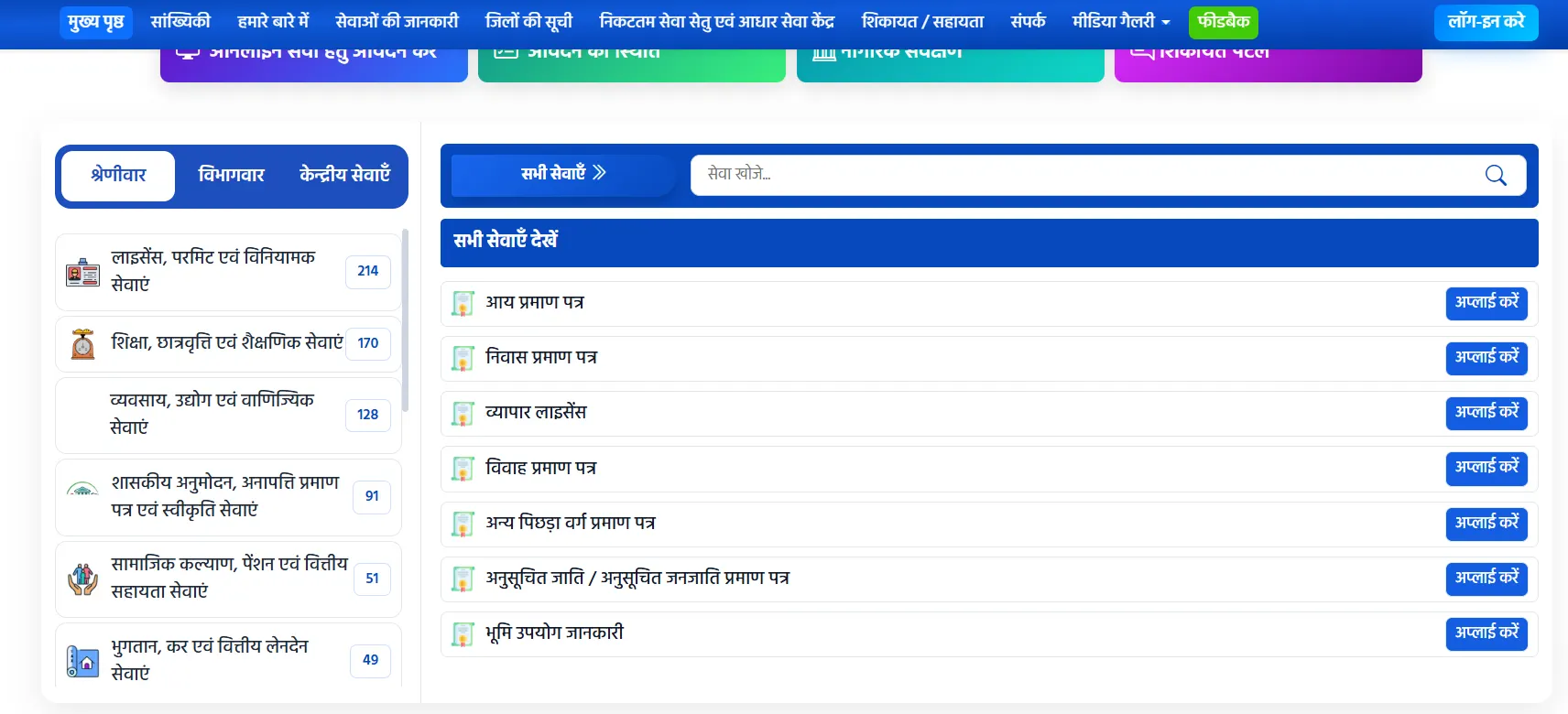
- By category / department / central services — three ways to browse
- “Search a service” — type any service name to find it
- Number of services in each category (214, 170, 128…) — 900+ in all
- “Apply” (अप्लाई करें) — start that service’s application here
| Certificate | Fee* | Portal time limit | Key documents |
|---|---|---|---|
| Income certificate | ₹30 | 7 days | Affidavit (mandatory) + patwari/sarpanch/parshad certificate + photograph + B-1 for farm income / Form 16 if salaried |
| Domicile (residence) certificate | ₹30 | 15 days | Affidavit (mandatory) + photograph (mandatory) + proof of at least 15 years’ stay (mandatory) + educational certificate (mandatory) |
| Caste certificate (ST/SC) | ₹30 | 22 days | Caste proof: a family member’s caste certificate or old revenue records |
| Caste certificate (OBC) | ₹30 | 22 days | Affidavit + income proof + OBC proof |
| Birth certificate | ₹30 | 15 days | Parents’ Aadhaar + address proof + hospital discharge slip/birth report or Anganwadi/ANM/Mitanin report |
| Death certificate | ₹30 | — | Deceased’s Aadhaar and ID + residence proof + ration card + affidavit of date/time of death or doctor’s slip |
| Marriage certificate | ₹30 | — | Birth certificate of both groom and bride (age) + affidavit of both + invitation card + photos |
Note — an income certificate is valid for 1 year from the date of issue. Plan a renewal before scholarship or admission season.
Caste certificate — the most important in Chhattisgarh
Chhattisgarh is one of India’s states with the highest Scheduled Tribe (ST) population — so here the caste certificate, especially the ST certificate, is the most in-demand document for education, reservation, scholarships and government jobs. For SC/ST and OBC proof, the portal accepts these older records:
- Misalold settlement record
- Adhikar Abhilekhrecord of rights
- Jamabandirevenue record
- 1931 census registerold record showing caste
- 1949 citizen registerold record showing caste
- Dakhil-kharij panjimutation register
Optional supporting papers include a vanshavali (family tree), a gram sabha proposal for rural applicants, and proof of cadre allocation under the Madhya Pradesh Reorganisation Act, 2000. Your family’s old land records may be available on the CG Bhuiyan portal — and old revenue records themselves count as caste proof.
How to register and log in on Sewa Setu
You can apply at a centre without an account, but registering lets you apply and track from home.
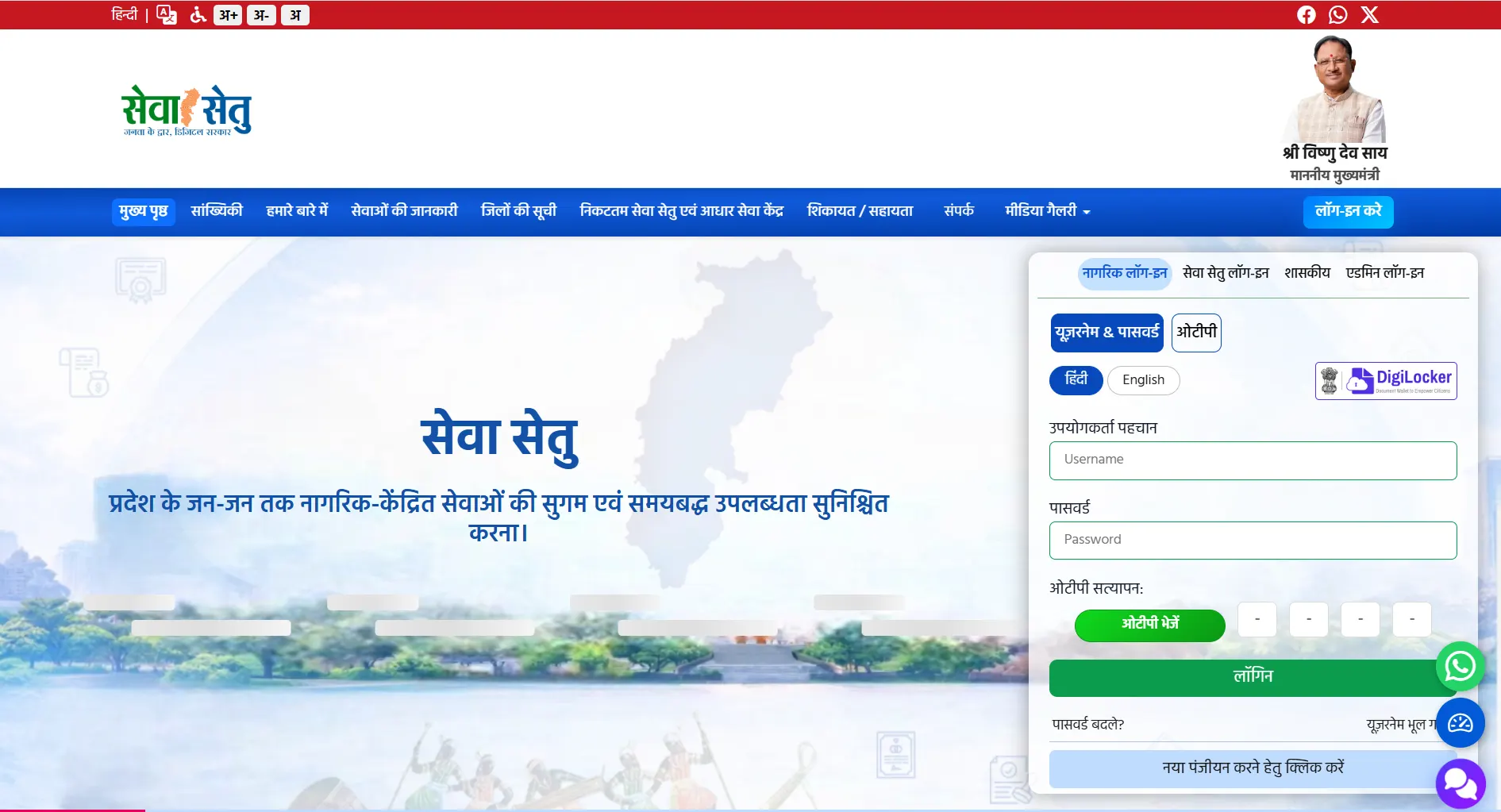
- “लॉग-इन करें” (Login) button
- “नागरिक लॉग-इन” (Citizen Login) tab — for the public
- Login with “Username & Password” or “OTP”
- Login with DigiLocker
- “नया पंजीयन करने हेतु क्लिक करें” — click for new registration
New registration (citizen)
Open Citizen Login
Open sewasetu.cgstate.gov.in (opens in a new tab) and go to Citizen Login (नागरिक लॉग-इन).
Click new registration
Below the login box, click “नया पंजीयन करने हेतु क्लिक करें” (click here for new registration).
Fill the form and submit
Enter user name, full name, district, a security question and answer, mobile number, e-mail and address, then submit.
Receive your password
Per the CHiPS manual, the password is sent to your registered mobile once registration is accepted. Change it after logging in.
Login methods
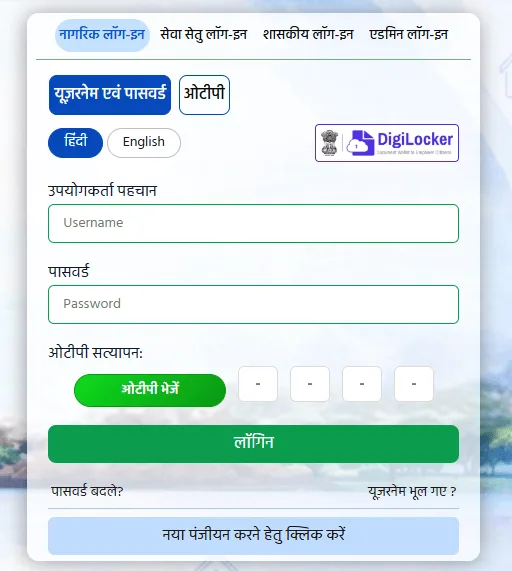
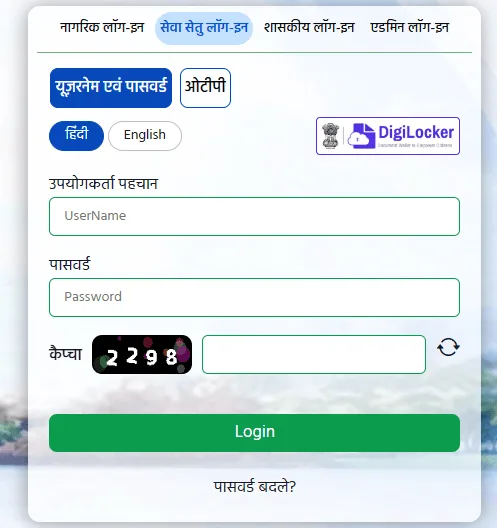
Sewa Setu has four login tabs — Citizen Login, Sewa Setu Login, Government (शासकीय) and Admin Login. For an ordinary citizen, Citizen Login is the right choice.
- Username & PasswordUsername, password and an OTP sent to your registered mobile.
- OTPJust the OTP sent to your registered mobile number.
- DigiLockerThe login box also links to sign-in with DigiLocker.
The login box has a Hindi / English language toggle, and “Forgot Password?” and “Forgot Username?” links sit underneath it.
Which login tab to choose
How to apply for a certificate — step by step
The CHiPS income certificate manual sets out the process, and the caste and domicile services follow the same pattern with their own documents.
Log in and open the service
Log in, search for the service you need and open it. The service page lists the required documents — click the button to continue.
Aadhaar e-authentication
Enter the applicant’s and beneficiary’s names, choose the office and address, then your Aadhaar number and your name in English as on the card, tick consent and authenticate.
Fill the application form
Fill the form, save and check the preview.
Upload documents
Upload scans with Choose File and UPLOAD, then save the attachments.
Pay the ₹30 fee
Complete the online payment.
Tick the declaration and submit
Accept the declaration and submit the application.
Save the acknowledgement and ARN
The acknowledgement carries your Application Reference Number (ARN) — you need it for every status check.
Check before you pay
Per the portal’s refund policy, fees aren’t returned once an application is successfully submitted, so check your uploads first. Failed online payments are refunded automatically under bank and gateway norms.
How to check application status
Open Application Status
Click “Application Status” on the home page, or open the status page (opens in a new tab) directly.
Choose Sewa Setu or CHOiCE
Choose Sewa Setu for applications on the new portal, or CHOiCE if you applied at a CHOiCE centre (only a CHOiCE ARN works there).
Enter details and Track Status
Select district and service if asked, enter your ARN (or mobile number) and the captcha, then click Track Status.
If you see “No data found”, recheck the ARN and make sure you chose Sewa Setu or CHOiCE correctly. Per the FAQ you get SMS and WhatsApp alerts at every stage, so the status usually reaches you first.
What each status means
| Status | Meaning | What to do |
|---|---|---|
| Submitted / Pending | Filed, verification pending | Wait |
| Under Verification | Officer is checking | Wait 7–22 days |
| Approved | Certificate issued, ready to download | Download |
| Rejected | Application rejected | Check reason, correct, reapply |
How to download and verify a certificate
Per the FAQ, these are the ways to get your certificate:
PDF from the portal
Open the PDF with the “View” button on the status result and print.
On WhatsApp
The certificate is sent on WhatsApp once issued.
Print at a centre
Collect a printed copy from a Sewa Setu Kendra / CHOiCE centre for a small printing charge.
DigiLocker
Certificates can also be accessed through DigiLocker.
Certificates are digitally signed and carry a QR code, so any office can scan it to confirm the certificate is genuine. News reports from July 2026 say QR verification on income, caste and domicile certificates was introduced to curb fake certificates.
Sewa Setu Kendra / CHOiCE / CSC — the offline route
Citizens who cannot apply online can visit the nearest service centre. The “निकटतम सेवा सेतु एवं आधार सेवा केंद्र” (nearest Sewa Setu & Aadhaar centre) link on the portal’s home page finds one near you.
Sewa Setu Kendra
In government premises — collectorate, tehsil office and some municipal corporations.
CHOiCE centre / CSC
Run from village-level entrepreneurs’ (VLE) premises.
Per the manual, the ₹30 service fee at a centre includes scanning of up to five documents; the operator may charge separately for more. Always take a receipt, and complain through “शिकायत / सहायता” (complaint / help) if you are overcharged.
Fees and time limits — two layers
The fee is the same online and at a centre — the income, domicile, SC/ST and OBC service pages each show ₹30. Time limits come in two layers, and it helps to know both:
- Portal target
- Income — 7 days · Domicile — 15 days · SC/ST and OBC — 22 days
- Legal ceiling
- Income, domicile, temporary & permanent caste — 30 working days
The portal target is what you’ll usually see met; 30 working days is the line that triggers the Act.
Who is answerable
| Certificate | Issued by | Competent authority | Appellate officer |
|---|---|---|---|
| Income, domicile, temporary caste | Tehsildar / Naib Tehsildar | SDO (Revenue) | Collector |
| Permanent caste | SDO (Revenue) | Collector | Commissioner |
Source: Revenue and Disaster Management Department notification of 16 May 2013 (under the Lok Seva Guarantee Act).
Your legal right — Lok Seva Guarantee Adhiniyam 2011
The Chhattisgarh Lok Seva Guarantee Adhiniyam, 2011 (Act No. 23 of 2011) guarantees time-bound delivery of every notified service. If a certificate is delayed past its legal limit or wrongly refused, the remedy is in this Act.
Under section 4(4), an unjustified delay can attract a penalty on the responsible officer of ₹100 per day, up to ₹1,000, paid to the applicant after a hearing. Under section 7(1) you can appeal within 30 days, and the appeal must be decided within 45 days.
How to complain
The portal has a “शिकायत / सहायता” (grievance / help) form and a WhatsApp chat option. The contact page lists the Atal Digital Sewa Setu manager for each district. Support works 9 am to 9 pm, all seven days except national holidays. Helpline: 1076 · official WhatsApp: +91 92034 06400.
How to appeal
For a delay or wrongful refusal, approach the competent authority (SDO Revenue) and appellate officer (Collector) named in the 2013 notification, carrying your acknowledgement and ARN.
- penalty for delay
- ₹100/day
- maximum penalty
- ₹1,000
- to file an appeal
- 30 days
- appeal decision
- 45 days
CG government portal directory — what connects to Sewa Setu
Sewa Setu doesn’t stand alone — it is the centre of Chhattisgarh’s network of government portals, and its certificates are required by several other services.
Sewa Setu (eDistrict CG)
Income, caste, domicile and every other certificate and citizen service.
How to applysewasetu.cgstate.gov.inCG Bhuiyan (land records)
B-1 (Khatauni), P-II (Khasra), Girdawari. Inheritance needs the death certificate + B-1; old revenue records also serve as caste proof.
Read the full guidebhuiyan.cg.nic.inCG Bhu Naksha
P-II Naksha (cadastral map) — field and plot boundaries online.
Read the full guidebhunaksha.cg.nic.inCG Scholarship
SC/ST/OBC post-matric scholarships — every application needs income + caste + domicile certificates from Sewa Setu.
Read the full guidepostmatric-scholarship.cg.nic.in
Frequently asked questions
What happened to the eDistrict CG website?
How do I register on Sewa Setu?
What is the fee for an income certificate in Chhattisgarh?
How many days does a caste certificate take in CG?
How can I check my CG eDistrict status?
How long is a CG income certificate valid?
Can I get my certificate on WhatsApp?
Is a CHOiCE centre different from a Sewa Setu Kendra?
What documents are needed for a caste certificate?
Can I apply for multiple services from one account?
My certificate isn’t downloading — what should I do?
What if my certificate is delayed or wrongly refused?
What is the Sewa Setu helpline?
Quick reference table
| Detail | Information |
|---|---|
| Official portal | sewasetu.cgstate.gov.in |
| Old address (redirects) | cgedistrict.cgstate.gov.in |
| Run by | CHiPS (Chhattisgarh Infotech Promotion Society), Raipur |
| Journey | CHOiCE (2003) → e-District (2015) → Sewa Setu (2026) |
| Total services | 900+ (official list) |
| Governing law | Chhattisgarh Lok Seva Guarantee Adhiniyam, 2011 |
| Income/domicile/caste fee | ₹30 (online and at a centre) |
| Time (income) | 7 days (portal) / 30 working days (legal) |
| Time (domicile) | 15 days (portal) / 30 working days (legal) |
| Time (SC/ST, OBC) | 22 days (portal) / 30 working days (legal) |
| Income certificate validity | 1 year |
| Issued by (income/domicile/temp. caste) | Tehsildar / Naib Tehsildar |
| Issued by (permanent caste) | SDO (Revenue) |
| Status check | Application Status → Sewa Setu/CHOiCE → ARN |
| Download | Portal / WhatsApp / Sewa Setu Kendra / DigiLocker |
| Verification | QR code |
| New features (2026) | WhatsApp applications, DBT, Bhashini multilingual |
| Helpline | 1076 · WhatsApp +91 92034 06400 · sewasetu.helpline@cgchips.in |
| Support hours | 9 am – 9 pm, all 7 days except national holidays |